

Today I will show you how to create cool table design using CSS3; you can use these tables for data handling and data presentation. Using the same old table code and a little of CSS3 to spice things up, we will achieve a nice looking design without noticing that we are using plain old tables.
Here is the link for the Demo.
You can download the HTML zip at the bottom of this tutorial!
Copy the markup below, and paste it in your favorite code editor (Dreamweaver for me) and save as index.html.
Let’s start the markup
<table border="0">

<tr>

<th>Payment Number</th>

<th>Client</th>

<th>Date</th>

<th>Total</th>

</tr>

<tr>

<td>0524/0156643435891</td>

<td>ACME Company</td>

<td>10/18/2011</td>

<td>$320.00</td>

</tr>

<tr>

<td>0524/45645853011</td>

<td>ACME Company</td>

<td>10/18/2011</td>

<td>$320.00</td>

</tr>

<tr>

<td>0524/0343432453423211</td>

<td>ACME Company</td>

<td>10/18/2011</td>

<td>$320.00</td>

</tr>

</table>
As you can see I just put dummy data on the table, the main focus of this tutorial is the design. Below is the output of our table on a browser without a design.
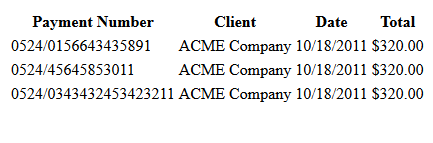
Now we have all the elements a table needs, a header, body and footer. For this tutorial we will use the table as data storage. As you can see we don’t have any designs at all, we will do that in a second.
For the sake of the tutorial we will use an inline CSS (not recommended for production sites), inside the <head> tag put this <style> and copy the CSS code below and paste inside style, make sure you close the style tag</style>.
CSS3 Design
table{

width:100%;

border:5px solid #386977;

border-collapse: collapse;

border-spacing: 0;

}

tr, td{

font-size:14px;

color:#222222;

text-shadow:0 1px 1px #fff;

padding:5px;

text-align:center;

border-bottom:1px solid #D3DDE2;

border-right:1px dashed #D3DDE2;

background: #feffff; /* Old browsers */

background: -moz-linear-gradient(top,  #feffff 0%, #e6f1f7 100%); /* FF3.6+ */

background: -webkit-gradient(linear, left top, left bottom, color-stop(0%,#feffff), color-stop(100%,#e6f1f7)); /* Chrome,Safari4+ */

background: -webkit-linear-gradient(top,  #feffff 0%,#e6f1f7 100%); /* Chrome10+,Safari5.1+ */

background: -o-linear-gradient(top,  #feffff 0%,#e6f1f7 100%); /* Opera 11.10+ */

background: -ms-linear-gradient(top,  #feffff 0%,#e6f1f7 100%); /* IE10+ */

background: linear-gradient(top,  #feffff 0%,#e6f1f7 100%); /* W3C */

filter: progid:DXImageTransform.Microsoft.gradient( startColorstr='#feffff', endColorstr='#e6f1f7',GradientType=0 ); /* IE6-9 */

}

th{

color:#097799;

text-shadow:0 1px 1px #fff;

font:bold 16px Arial, Helvetica, sans-serif;

padding:10px 15px;

background:#090;

border-bottom:1px solid #0591BC;

background: #87e0fd; /* Old browsers */

background: -moz-linear-gradient(top, #87e0fd 0%, #53cbf1 40%, #05abe0 100%); /* FF3.6+ */

background: -webkit-gradient(linear, left top, left bottom, color-stop(0%,#87e0fd), color-stop(40%,#53cbf1), color-stop(100%,#05abe0)); /* Chrome,Safari4+ */

background: -webkit-linear-gradient(top, #87e0fd 0%,#53cbf1 40%,#05abe0 100%); /* Chrome10+,Safari5.1+ */

background: -o-linear-gradient(top, #87e0fd 0%,#53cbf1 40%,#05abe0 100%); /* Opera 11.10+ */

background: -ms-linear-gradient(top, #87e0fd 0%,#53cbf1 40%,#05abe0 100%); /* IE10+ */

background: linear-gradient(top, #87e0fd 0%,#53cbf1 40%,#05abe0 100%); /* W3C */

filter: progid:DXImageTransform.Microsoft.gradient( startColorstr='#87e0fd', endColorstr='#05abe0',GradientType=0 ); /* IE6-9 */

}
Here is the output of our table, using gradient and padding the table looks nice and clean. Now our table is ready for data handling and presentation.
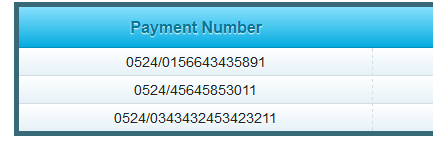
Honestly, there is nothing to explain here, because it’s plain CSS and for the gradient I’ve used Colorzilla Gradient Generator and paste it in th and tr, td. If you’re a developer this is so useful when handling and presenting data; after all clients love a cool GUI nowadays.
Here is the link for the Demo.
If you have designed a table using CSS3 for data handling, feel free to post your link below I would love to see your end result.
